BDB Platform
Redesign
BDB Platform
Redesign
BDB Platform
Redesign
Simplifying complex analytics with clarity and accessibility.
Simplifying complex analytics with clarity and accessibility.
ROLE
Product Designer
Product Designer
DURATION
8 Months
8 Months
EXPERTISE
UI/UX Design
UI/UX Design
PLATFORM
Web Application
Web Application
ROLE
Product Designer
DURATION
8 Months
EXPERTISE
UI/UX Design
PLATFORM
Web Application
Project Overview
Project Overview
BDB.ai is an enterprise-grade data analytics suite used by analysts and data engineers to connect, prepare, model, visualize, and interact with organizational data.
When I joined, the platform had grown organically across modules, resulting in:
Fragmented interaction patterns
Inconsistent visuals and terminology
Cognitive overload during long analytical sessions
No accessibility support or dark mode
These issues were hindering user productivity, increasing support overhead, and slowing adoption of newer modules.
Redesign Objective: Modernize the entire UX while retaining power-user efficiency and preparing the product for future expansion.
BDB.ai is an enterprise-grade data analytics suite used by analysts and data engineers to connect, prepare, model, visualize, and interact with organizational data.
When I joined, the platform had grown organically across modules, resulting in:
Fragmented interaction patterns
Inconsistent visuals and terminology
Cognitive overload during long analytical sessions
No accessibility support or dark mode
These issues were hindering user productivity, increasing support overhead, and slowing adoption of newer modules.
Redesign Objective: Modernize the entire UX while retaining power-user efficiency and preparing the product for future expansion.
Company
Company
Bizviz Technologies [ BDB.AI]
Bizviz Technologies
[ BDB.AI]
Team
Team
1 PM · 6 Engineers (FE/BE) · QA · Solutions Architect · Designer (me)
1 PM · 6 Engineers (FE/BE) · QA · Solutions Architect · Designer (me)
Scope
Scope
Complete end-to-end redesign of the BDB.ai data analytics suite — covering Data Connectors, Pipelines, Data Science Lab, Dashboard Designer, and Data Agent modules. The focus was on creating a unified design language, optimizing workflows, and improving overall usability and accessibility for power users.
Complete end-to-end redesign of the BDB.ai data analytics suite — covering Data Connectors, Pipelines, Data Science Lab, Dashboard Designer, and Data Agent modules. The focus was on creating a unified design language, optimizing workflows, and improving overall usability and accessibility for power users.
Problem Definition
Problem Definition
How might we…
Reduce cognitive load without removing power-user tools
Create a unified and scalable design language across highly technical modules
Enhance onboarding and accessibility for all users
Support both new and expert users with minimal disruption
How might we…
Reduce cognitive load without removing power-user tools
Create a unified and scalable design language across highly technical modules
Enhance onboarding and accessibility for all users
Support both new and expert users with minimal disruption
Constraints and Challenges
Constraints and Challenges
How might we reduce cognitive load for users managing complex, multi-step analytical workflows?
How might we create a visual language consistent enough that users don't have to relearn the interface across modules?
How might we design for both novice and expert users without forcing a compromise?
How might we make the platform viable for extended analytical sessions — both in accessibility and visual comfort?
Research and Discovery
Research and Discovery
Heuristic Evaluation
Heuristic Evaluation
Evaluated the platform using Nielsen’s heuristics + WCAG guidelines.
Key Findings :
Poor visibility of system status : Users frequently couldn't tell whether a pipeline was running, had failed, or simply hadn't been triggered. The platform gave no consistent feedback during async operations.
Inconsistent controls and unpredictable icon behavior : The same action worked differently depending on which module you were in — the product felt like five different tools forced under one navigation.
Missing feedback for errors and empty states : Zero-data screens and failure states had never been designed. Users had no in-product guidance when things went wrong.
Evaluated the platform using Nielsen’s heuristics + WCAG guidelines.
Key Findings :
Poor visibility of system status : Users frequently couldn't tell whether a pipeline was running, had failed, or simply hadn't been triggered. The platform gave no consistent feedback during async operations.
Inconsistent controls and unpredictable icon behavior : The same action worked differently depending on which module you were in — the product felt like five different tools forced under one navigation.
Missing feedback for errors and empty states : Zero-data screens and failure states had never been designed. Users had no in-product guidance when things went wrong.
User Journey Mapping
User Journey Mapping
Mapped the flow from data ingestion → transformation → modeling → visualization → insight generation.
Insights:
Unclear transitions between modules caused context loss
Users frequently restarted tasks due to missing feedback.
Mapped the flow from data ingestion → transformation → modeling → visualization → insight generation.
Insights:
Unclear transitions between modules caused context loss
Users frequently restarted tasks due to missing feedback.
Competitive Benchmarking
Competitive Benchmarking
Analyzed Snowflake, Databricks, Tableau, Power BI.
Takes:
Clear hierarchies matter
Dark mode is essential for long sessions
Unified action patterns reduce error
Analyzed Snowflake, Databricks, Tableau, Power BI.
Takes:
Clear hierarchies matter
Dark mode is essential for long sessions
Unified action patterns reduce error
Strategic Design Decisions
Strategic Design Decisions
Information Architecture
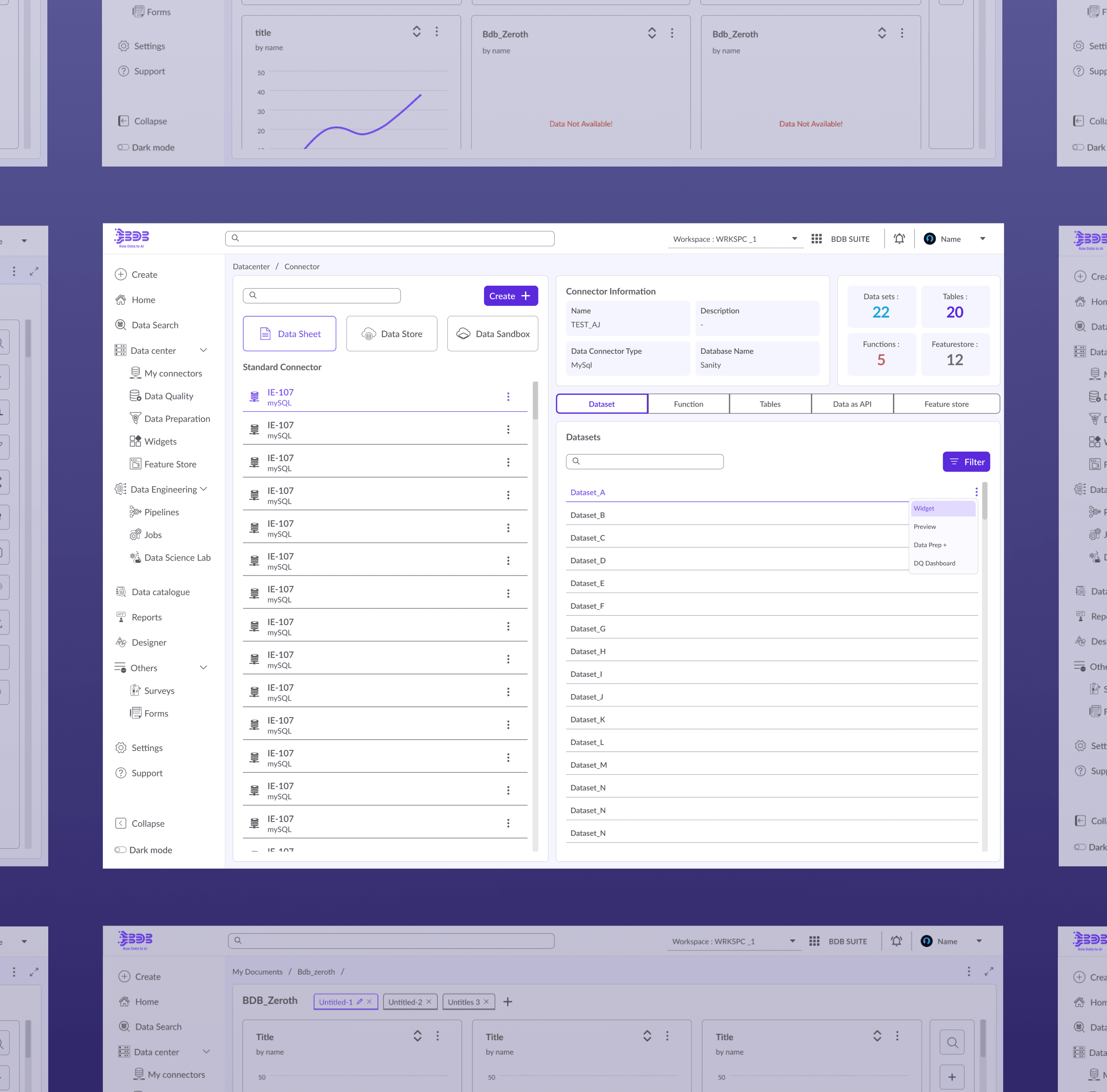
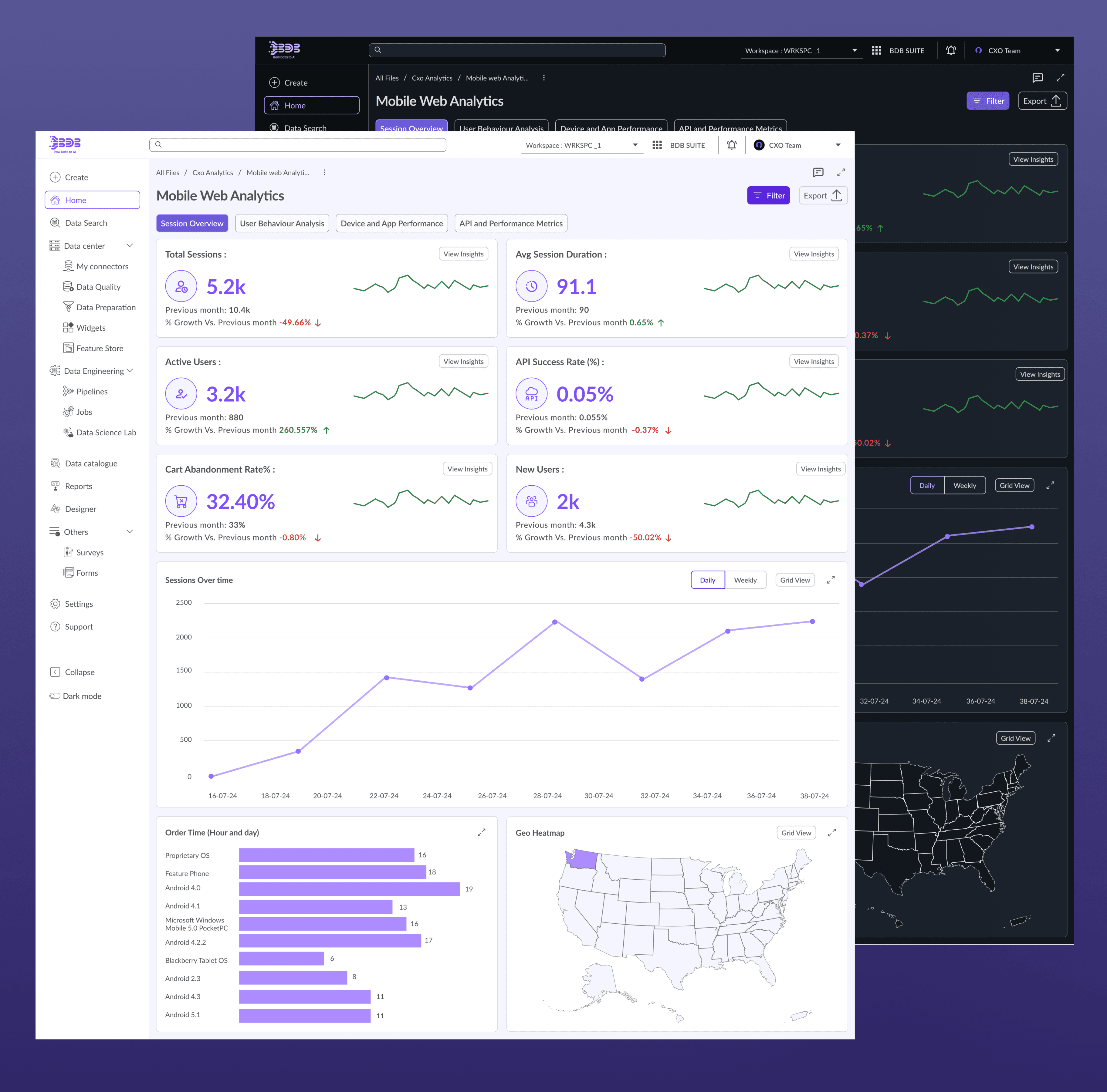
The existing IA grouped modules by technical category — which made sense to the engineers who built them, but not to analysts who think in terms of workflow phases. I reorganized the left rail into five functional clusters: Data Center, Engineering, Lab, Designer, and Reports. Each maps to a distinct phase of the analytical workflow. This reduced the number of navigational decisions users had to make to reach common tasks, and gave new users a mental model they could actually hold.
Visual System
I introduced a modular grid and typography scale to establish hierarchy across high-density data views. The real constraint: with six engineers maintaining the codebase, visual changes had to be incrementally implementable without wholesale rewrites. I prioritized changes where design impact was highest relative to engineering effort — typography and spacing before component redesigns, because they compound across the entire product.
Feedback & Empty States
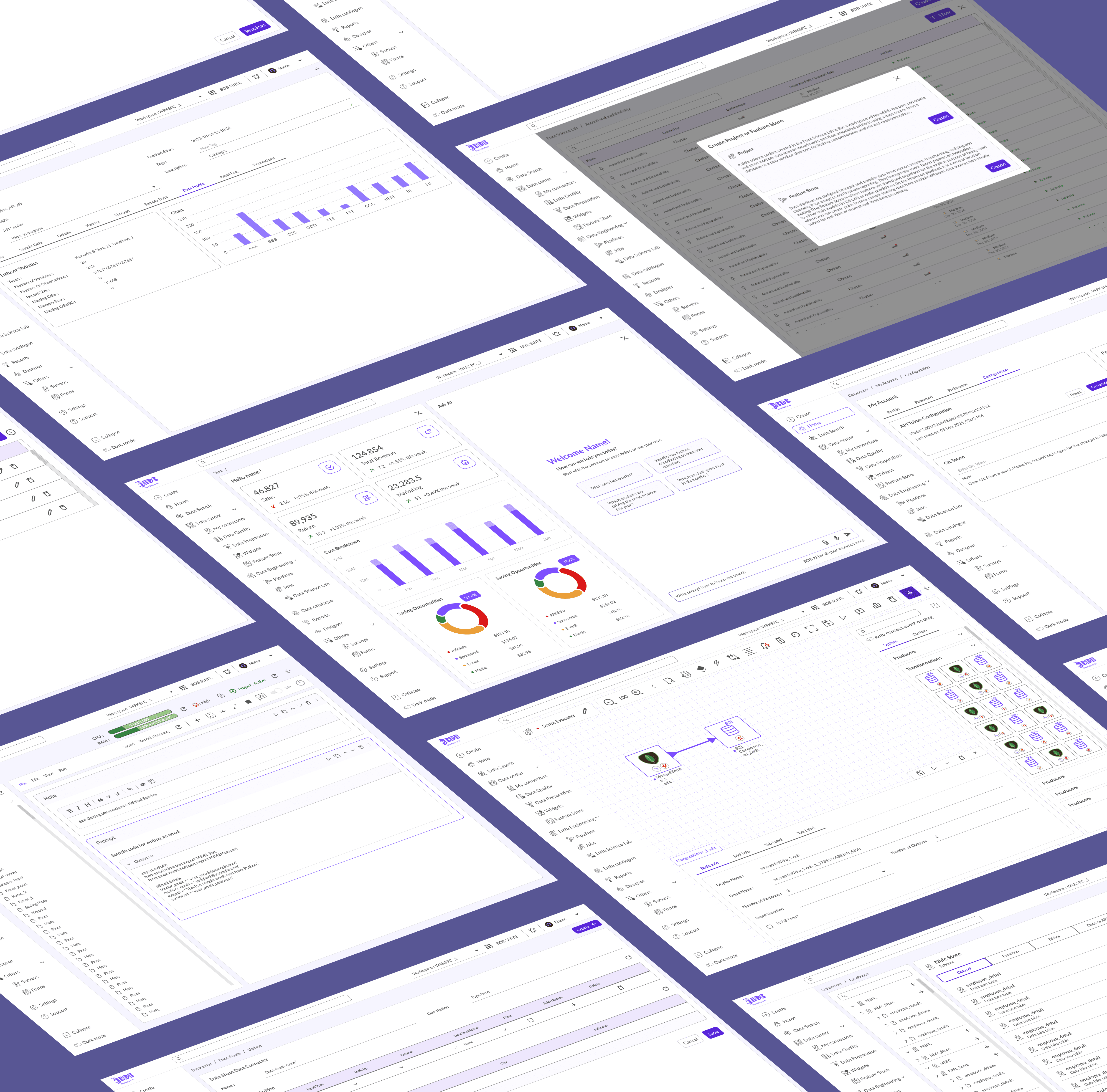
Missing feedback states were generating the platform's highest-volume support tickets. Users were stuck with no in-product guidance. I designed a comprehensive feedback system: skeleton loaders for async operations, contextual toast notifications with clear action paths, and guided empty state messaging that turned zero-data screens into orientation moments rather than dead ends.
Accessibility and Dark Mode
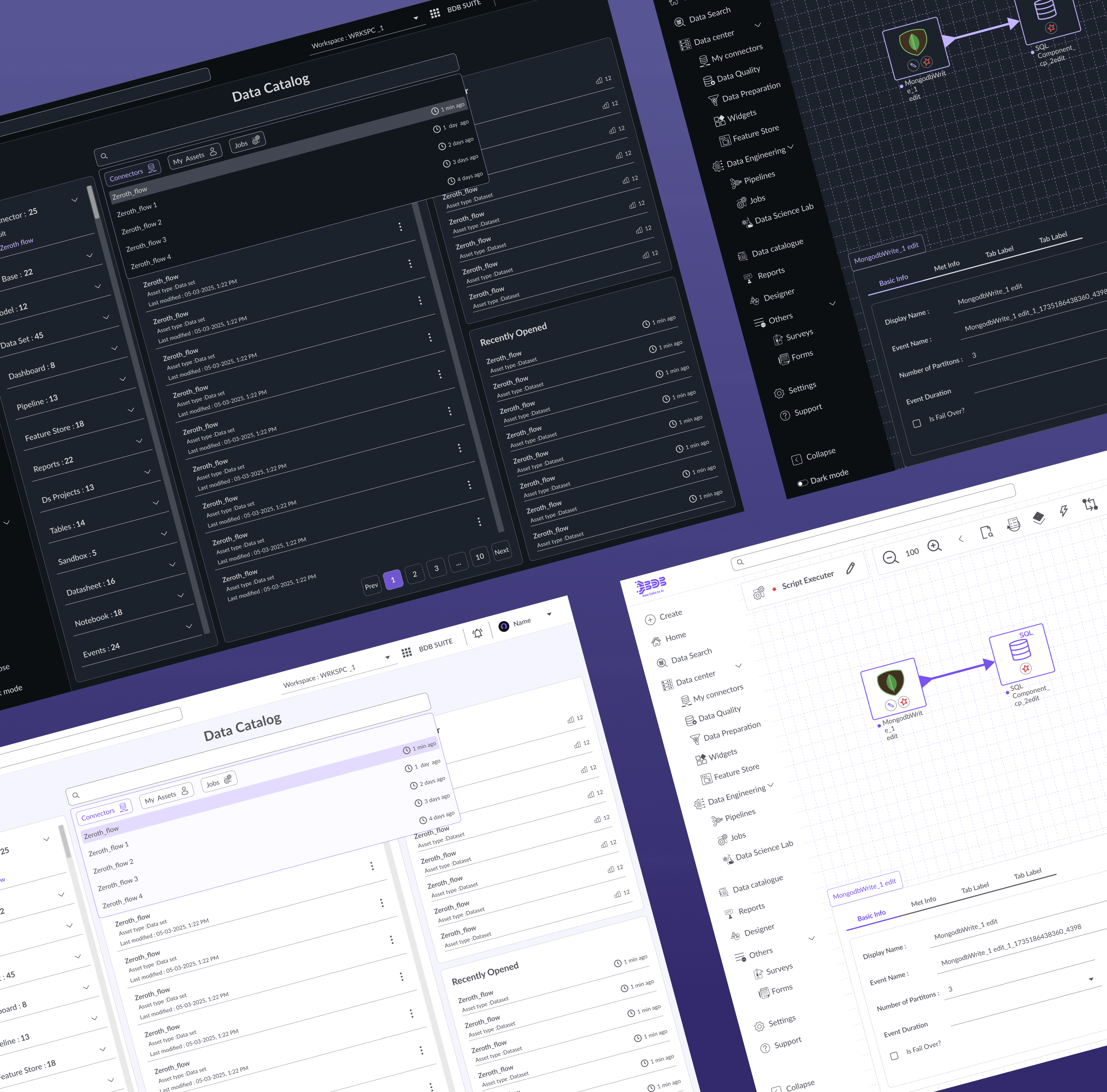
Support feedback and competitive benchmarking converged on the same gap: the platform wasn't designed for the extended sessions its users were spending in it. I designed a tokenized color system enabling full light/dark parity at WCAG AA contrast compliance, and implemented keyboard navigation parity and ARIA labels across all interactive components.
Information Architecture
The existing IA grouped modules by technical category — which made sense to the engineers who built them, but not to analysts who think in terms of workflow phases. I reorganized the left rail into five functional clusters: Data Center, Engineering, Lab, Designer, and Reports. Each maps to a distinct phase of the analytical workflow. This reduced the number of navigational decisions users had to make to reach common tasks, and gave new users a mental model they could actually hold.
Visual System
I introduced a modular grid and typography scale to establish hierarchy across high-density data views. The real constraint: with six engineers maintaining the codebase, visual changes had to be incrementally implementable without wholesale rewrites. I prioritized changes where design impact was highest relative to engineering effort — typography and spacing before component redesigns, because they compound across the entire product.
Feedback & Empty States
Missing feedback states were generating the platform's highest-volume support tickets. Users were stuck with no in-product guidance. I designed a comprehensive feedback system: skeleton loaders for async operations, contextual toast notifications with clear action paths, and guided empty state messaging that turned zero-data screens into orientation moments rather than dead ends.
Accessibility and Dark Mode
Support feedback and competitive benchmarking converged on the same gap: the platform wasn't designed for the extended sessions its users were spending in it. I designed a tokenized color system enabling full light/dark parity at WCAG AA contrast compliance, and implemented keyboard navigation parity and ARIA labels across all interactive components.
Design System Principles
Design System Principles
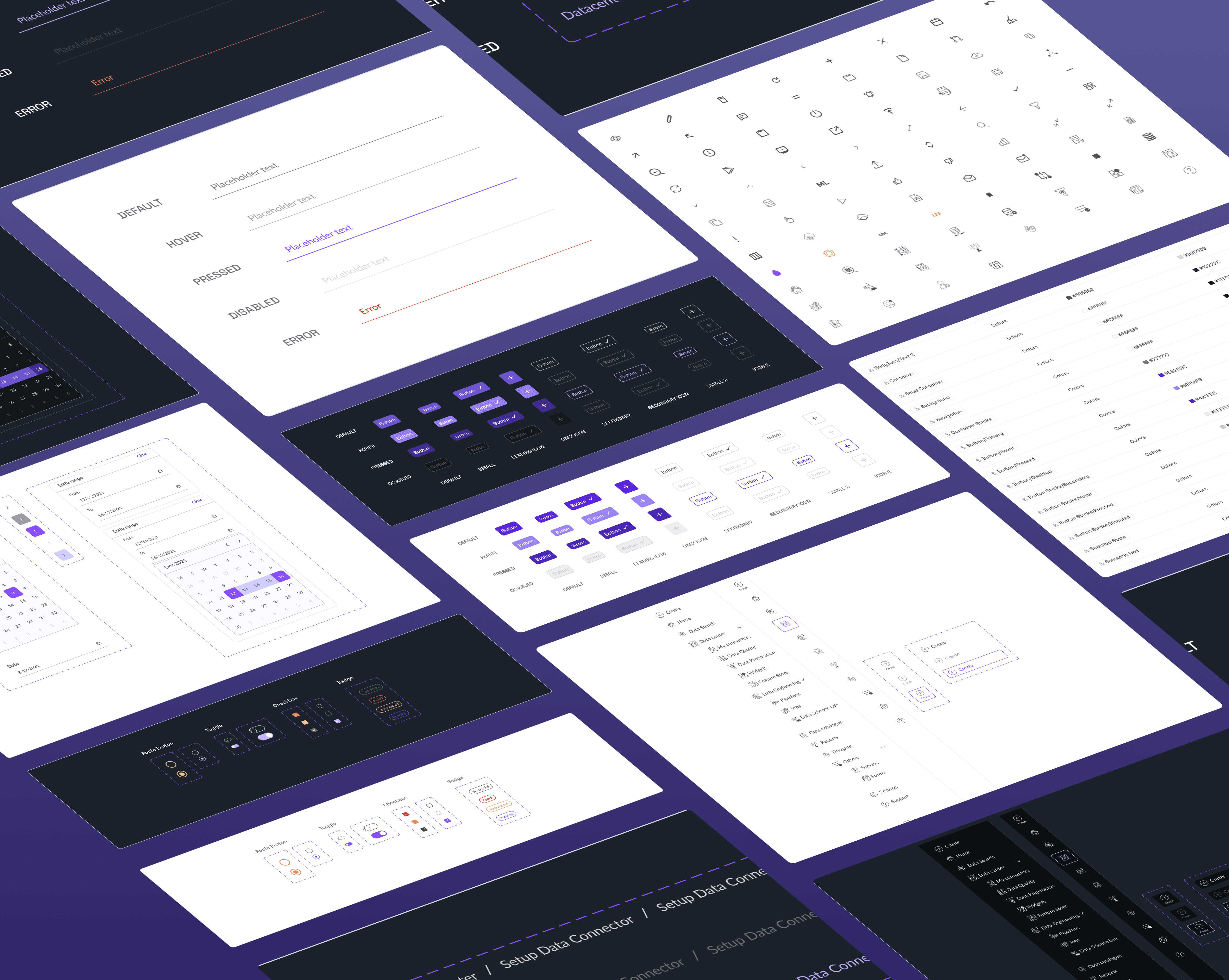
Consistency: Standardized components, spacing, icons
Scalability: Tokenized styles for future theme expansion
Clarity: Reduced cognitive load with white space and visual rhythm
Consistency: Standardized components, spacing, icons
Scalability: Tokenized styles for future theme expansion
Clarity: Reduced cognitive load with white space and visual rhythm
Old vs. New Design — Key Differences
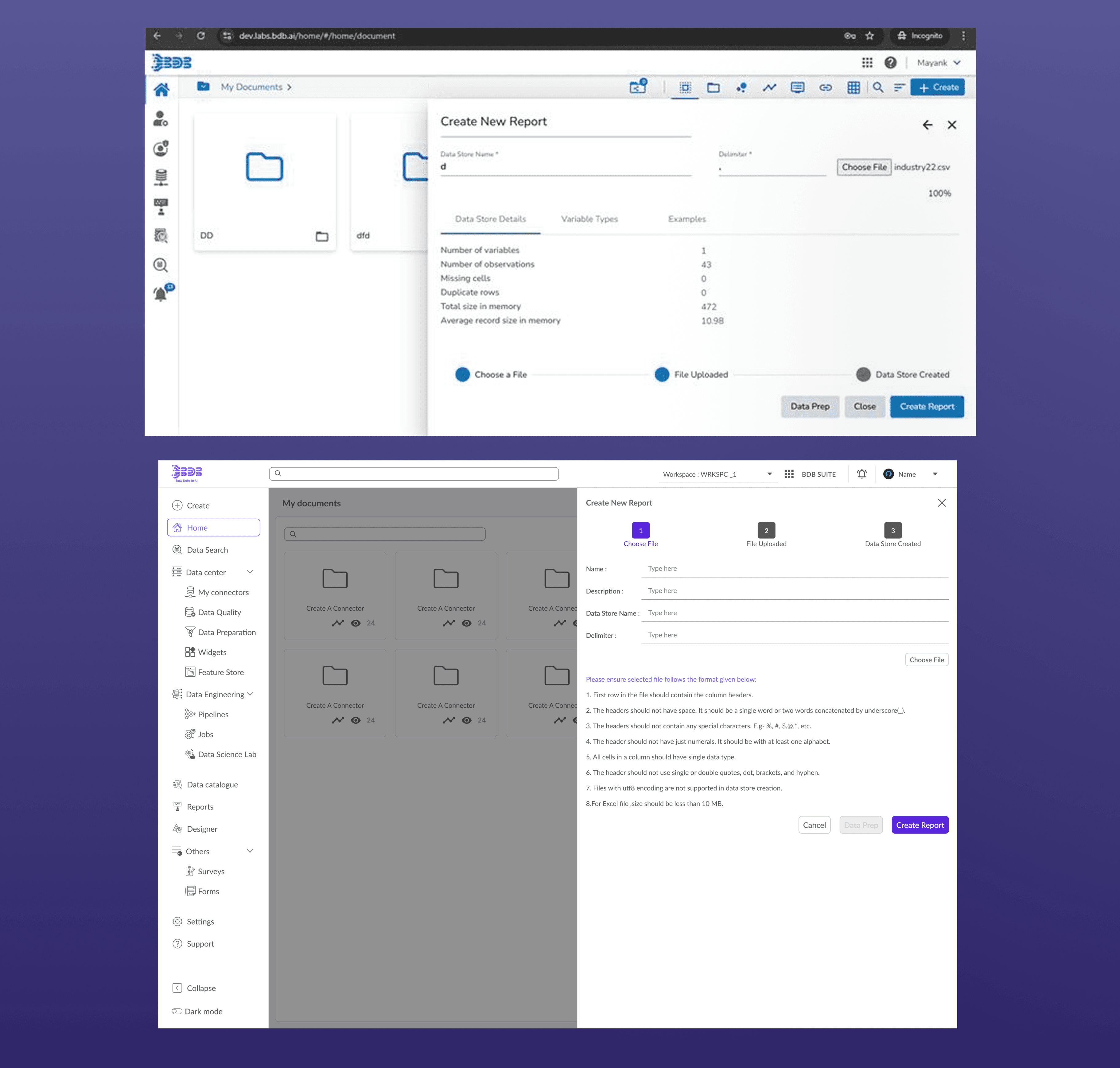
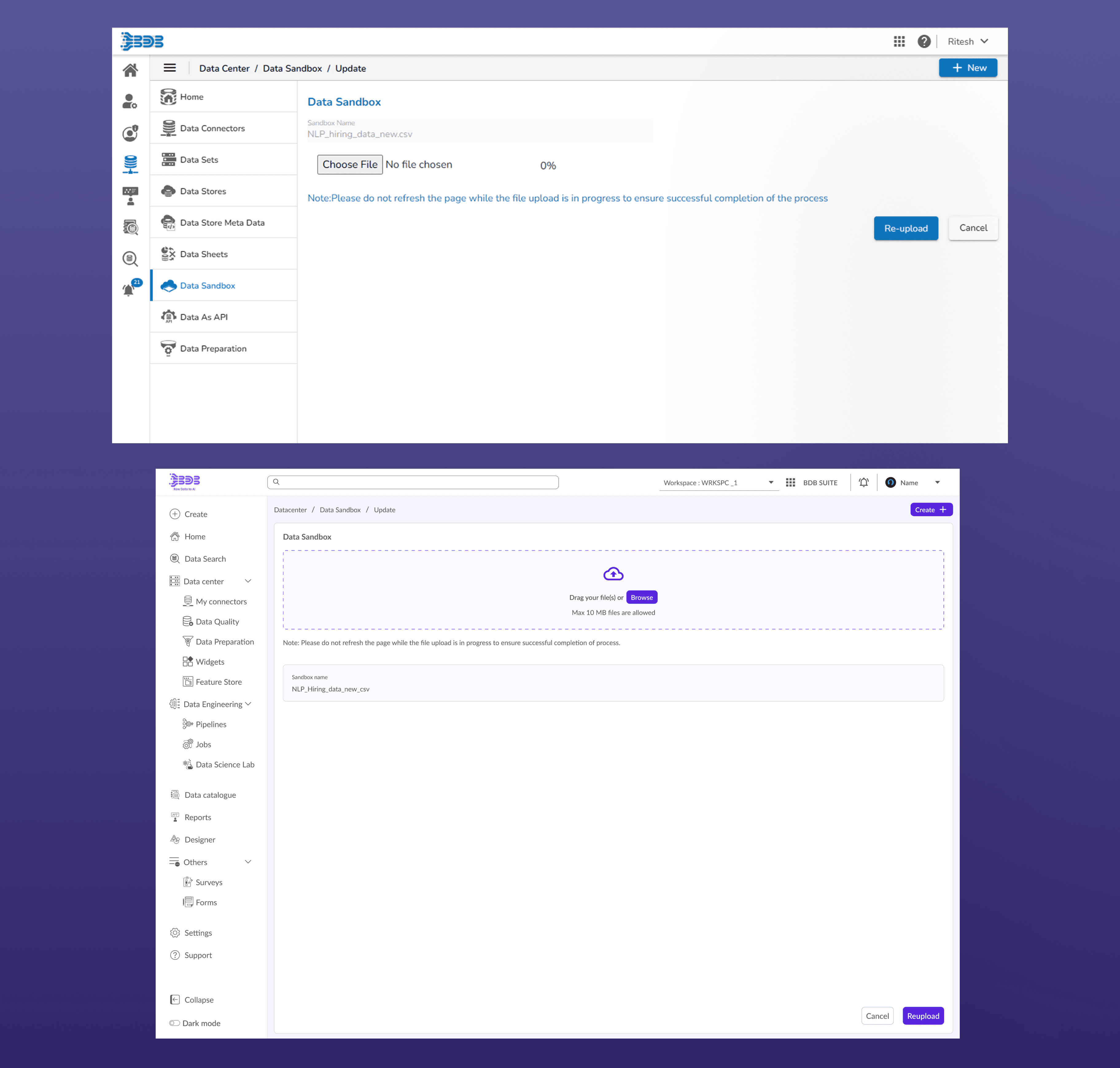
Old vs. New Design — Key Differences
Area
Area
Old Design
Old Design
New Design
New Design
Navigation
Navigation
Module transitions unclear; IA organized by technical category
Module transitions unclear; IA organized by technical category
Workflow-based clusters; predictable hierarchy users can internalize
Workflow-based clusters; predictable hierarchy users can internalize
Visual Hierarchy
Visual Hierarchy
Inconsistent typography, spacing, and density across modules
Inconsistent typography, spacing, and density across modules
Modular grid, clear hierarchy using type scale, accent color, and consistent padding
Modular grid, clear hierarchy using type scale, accent color, and consistent padding
Action Placement
Action Placement
Scattered and unpredictable
Scattered and unpredictable
Standardized row-level action cluster (Open → Edit → Share → Delete) with confirmation states
Standardized row-level action cluster (Open → Edit → Share → Delete) with confirmation states
Feedback System
Feedback System
No empty or error state design; no async loading feedback
No empty or error state design; no async loading feedback
Added skeleton loaders, toasts, and contextual empty-state messaging
Added skeleton loaders, toasts, and contextual empty-state messaging
Theme Support
Theme Support
Single light theme
Single light theme
Dual light & dark theme with tokenized color system (WCAG AA compliant)
Dual light & dark theme with tokenized color system (WCAG AA compliant)
Accessibility
Accessibility
Single light theme; minimal keyboard navigation
Single light theme; minimal keyboard navigation
Dual light/dark (WCAG AA); full keyboard parity; ARIA labels
Dual light/dark (WCAG AA); full keyboard parity; ARIA labels
Learnability
Learnability
High — users restarted tasks because the system gave no guidance
High — users restarted tasks because the system gave no guidance
Reduced — empty states and feedback systems now orient users
Reduced — empty states and feedback systems now orient users
Support burden
Support burden
Navigation and empty-state confusion: highest-volume ticket categories
Navigation and empty-state confusion: highest-volume ticket categories
Both categories decreased after rollout
Both categories decreased after rollout
Cognitive Load
Cognitive Load
High (dense layouts)
High (dense layouts)
Progressive disclosure — only relevant info visible at each step
Progressive disclosure — only relevant info visible at each step
Design-dev handoff
Design-dev handoff
No shared component vocabulary
No shared component vocabulary
Design system established as foundation for all subsequent work
Design system established as foundation for all subsequent work
Overall Impact
Overall Impact
Quantitative Results
Quantitative Results
32% faster module navigation post-redesign
40% fewer mis-clicks due to action consistency
84% user preference for dark mode
40% reduction in self-reported visual fatigue
Higher readability scores after contrast enhancements
Fewer onboarding support requests due to guided tours
32% faster module navigation post-redesign
40% fewer mis-clicks due to action consistency
84% user preference for dark mode
40% reduction in self-reported visual fatigue
Higher readability scores after contrast enhancements
Fewer onboarding support requests due to guided tours
Qualitative Impact
Qualitative Impact
Consistent workflows decreased context switching friction
Streamlined visuals helped long analytical sessions
Unified design system enhanced brand cohesion and future scalability
Consistent workflows decreased context switching friction
Streamlined visuals helped long analytical sessions
Unified design system enhanced brand cohesion and future scalability
Summary
Summary
Unified Ecosystem: Seamless transition across modules.
Efficiency Gains: Reduced task time and enhanced focus.
Brand Cohesion: Consistent tone, color, and iconography.
Scalable Foundation: Design system ready for future features
Unified Ecosystem: Seamless transition across modules.
Efficiency Gains: Reduced task time and enhanced focus.
Brand Cohesion: Consistent tone, color, and iconography.
Scalable Foundation: Design system ready for future features
Next Steps
Next Steps
Personalized dashboards & quick-start templates
Bulk actions across modules for expert users
Audit trails & activity logs
Expand AI-assisted insights based on usage patterns
Personalized dashboards & quick-start templates
Bulk actions across modules for expert users
Audit trails & activity logs
Expand AI-assisted insights based on usage patterns
What I'd approach differently:
What I'd approach differently:
I'd have pushed for phased usability testing during the rollout rather than waiting for post-launch feedback.
Next Project
BDB Design System
A unified, scalable design language for a complex enterprise analytics ecosystem
Design System
Next Project
BDB Design System
A unified, scalable design language for a complex enterprise analytics ecosystem
Design System